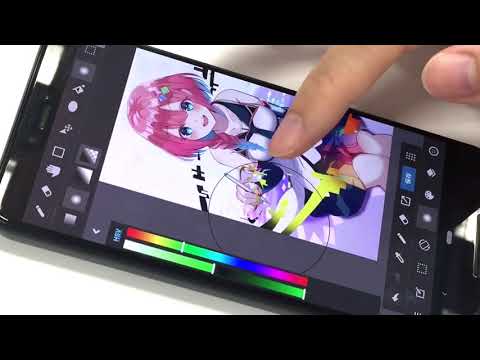

MediBang Paint:Draw Art, Comic
Contains adsIn-app purchases

star
303K reviews

Parental guidance
info
10M+
Downloads


About this app
MediBang Paint is an art app for sketching, painting, drawing, and coloring using pencil and pen tools.
Designed for artists of all skill levels, it supports creating digital art, sketches, comics, and illustrations with ease. Whether you’re starting your first art book or refining your next dibujo, MediBang Paint offers powerful features for every creator.
With over 180 brushes included, from pencil and pen to airbrush and watercolor, it makes sketching and painting intuitive and smooth. Artists who subscribe can access 700+ additional brushes and create their own custom sets for a fully personalized workflow.
This art app is perfect for creating digital drawings, sketch-based concepts, and detailed illustrations. It supports PSD and CMYK formats for professional publishing, making it ideal for art books and comic production. Optimized for mobile and tablet, MediBang Paint ensures a smooth and responsive drawing experience.
Comic and manga creators benefit from built-in comic paneling tools, screen tones, speech bubble options, and over 60 fonts. From early pencil sketches to polished comic pages, everything can be done within the app.
Work across devices with cloud sync and collaborate on the same canvas with friends or team members. Share your timelapse recordings and drawing process with the creative community on social platforms.
Main Features:
・180+ brushes: including pencil, pen, paint, and more
・700+ additional brushes with subscription plans
・Comic panel and screen tone tools for manga and comic artists
・Supports sketching, drawing, and coloring workflows
・Compatible with PSD and CMYK files
・Cloud sync for seamless use across devices
・Collaborative drawing features for group projects
・Timelapse recording for showcasing your process
・Access tutorials, templates, and resources via MediBang Library
Whether you’re working on a new sketch, experimenting with a painting, or finishing a comic, MediBang Paint is a trusted art app for all styles and workflows. Enjoy a professional drawing experience with a lightweight and efficient design. Ideal for digital artists seeking a powerful alternative to Procreate or Clip Studio.
Start your next creation today—draw, color, and sketch with MediBang Paint.
Designed for artists of all skill levels, it supports creating digital art, sketches, comics, and illustrations with ease. Whether you’re starting your first art book or refining your next dibujo, MediBang Paint offers powerful features for every creator.
With over 180 brushes included, from pencil and pen to airbrush and watercolor, it makes sketching and painting intuitive and smooth. Artists who subscribe can access 700+ additional brushes and create their own custom sets for a fully personalized workflow.
This art app is perfect for creating digital drawings, sketch-based concepts, and detailed illustrations. It supports PSD and CMYK formats for professional publishing, making it ideal for art books and comic production. Optimized for mobile and tablet, MediBang Paint ensures a smooth and responsive drawing experience.
Comic and manga creators benefit from built-in comic paneling tools, screen tones, speech bubble options, and over 60 fonts. From early pencil sketches to polished comic pages, everything can be done within the app.
Work across devices with cloud sync and collaborate on the same canvas with friends or team members. Share your timelapse recordings and drawing process with the creative community on social platforms.
Main Features:
・180+ brushes: including pencil, pen, paint, and more
・700+ additional brushes with subscription plans
・Comic panel and screen tone tools for manga and comic artists
・Supports sketching, drawing, and coloring workflows
・Compatible with PSD and CMYK files
・Cloud sync for seamless use across devices
・Collaborative drawing features for group projects
・Timelapse recording for showcasing your process
・Access tutorials, templates, and resources via MediBang Library
Whether you’re working on a new sketch, experimenting with a painting, or finishing a comic, MediBang Paint is a trusted art app for all styles and workflows. Enjoy a professional drawing experience with a lightweight and efficient design. Ideal for digital artists seeking a powerful alternative to Procreate or Clip Studio.
Start your next creation today—draw, color, and sketch with MediBang Paint.
Sketch, draw, and paint with pencil and pen. A powerful art app for all creators
Updated on
Featured stories

Safety starts with understanding how developers collect and share your data. Data privacy and security practices may vary based on your use, region, and age. The developer provided this information and may update it over time.


Ratings and reviews
239K reviews

Rose Price
- Flag inappropriate
- Show review history
May 24, 2025
I used to love this app. Now you have to watch an advert just to use any brush at all. Even once you've done that you still have to sit through ads popping up when you go off and on the app, ads at the top of the screen, ads interrupting you as you draw, etc. The last update also deleted all of my custom brushes, so thanks for that. Premium is a monthly subscription service rather than a one time purchase which personally puts me off getting it. I've gone back to traditional art on paper.
40 people found this review helpful

Evan Clay
- Flag inappropriate
July 13, 2023
The free version is fine and it's a good app for doing digital art on your phone. Biggest problem is occasionally it will "back up" your art while you're in the middle of drawing, and during the "backing up" it will crash and not only won't have backed up your work, but will have deleted any progress you made after your last save. It's incredibly annoying and it doesn't look like there's any way to turn off this feature. The settings and account stuff is also hard to navigate
24 people found this review helpful

Annie Stars
- Flag inappropriate
- Show review history
February 26, 2025
Updating my review after 4 years to a 3 star review. The app is still great to use, but I don't like how in order to transfer your project files to a Flash Drive off of your phone, you have to buy a higher premium membership. I'm fine paying for the cheap premium, but I wish I could just save my project files onto my PC through file transfer without paying.
86 people found this review helpful
What’s new
Updated the design of part of the top page.
Made the Premium introduction page easier to understand.
Made the Premium introduction page easier to understand.
App support
About the developer
MEDIBANG INC.
medibang_support@medibang.com
1-10-5, DOGENZAKA
SHIBUYA PLACE 2F.
SHIBUYA-KU, 東京都 150-0043
Japan
+81 80-4925-4525


