
Android Auto

star
6.26M reviews

PEGI 3
info
10B+
Downloads

PEGI 3
Learn more


About this app
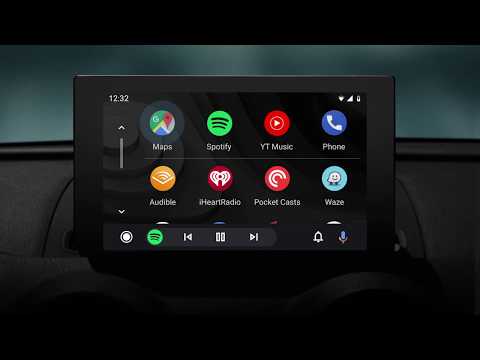
Android Auto is your smart driving companion that helps you stay focused, connected, and entertained with the Google Assistant. With a simplified interface, large buttons, and powerful voice actions, Android Auto is designed to make it easier to use apps that you love from your phone while you’re on the road.
Just say “Ok Google” to...
• Route to your next destination using Google Maps or Waze with real-time GPS navigation and traffic alerts.
• Get updates on your route, ETA, and hazards in real-time.
• Have the Google Assistant check your calendar for you so you know where you need to be.
• Set reminders, get updates on the news, and check last night’s score.
• Avoid distractions while driving by setting a custom do not disturb message while driving.
• Make calls using Google Assistant and answer incoming calls with just a tap.
• Access your contacts folder and send and receive messages with the Google Assistant using SMS, Hangouts, WhatsApp, Skype, Telegram, WeChat, Kik, Google Allo, and many more messaging apps.
• Manage your infotainment system like never before. Listen to your favorite media apps including Spotify, Pandora, iHeartRadio, Google Play Music, Amazon Music, SiriusXM, TIDAL - High Fidelity Music Streaming, Napster Music, and Deezer. Many more music, radio, news, sports news, audiobook, and podcast apps are also supported.
The number of compatible apps is always growing! For a full list of compatible apps, go to http://g.co/androidauto
To use Android Auto, you’ll need a phone running Android 6.0 or higher and an active data connection.
Over 400 car models now support Android Auto! To find out if your car display is compatible and how to enable it, check your owner’s manual or contact your car’s manufacturer. Once enabled, use a high quality USB cable to connect your phone to your car, then launch Android Auto to get going!
Learn more about Android Auto and compatible cars at http://android.com/auto
For support: http://support.google.com/androidauto
Get help from our community: https://productforums.google.com/forum/#!forum/android-auto
Just say “Ok Google” to...
• Route to your next destination using Google Maps or Waze with real-time GPS navigation and traffic alerts.
• Get updates on your route, ETA, and hazards in real-time.
• Have the Google Assistant check your calendar for you so you know where you need to be.
• Set reminders, get updates on the news, and check last night’s score.
• Avoid distractions while driving by setting a custom do not disturb message while driving.
• Make calls using Google Assistant and answer incoming calls with just a tap.
• Access your contacts folder and send and receive messages with the Google Assistant using SMS, Hangouts, WhatsApp, Skype, Telegram, WeChat, Kik, Google Allo, and many more messaging apps.
• Manage your infotainment system like never before. Listen to your favorite media apps including Spotify, Pandora, iHeartRadio, Google Play Music, Amazon Music, SiriusXM, TIDAL - High Fidelity Music Streaming, Napster Music, and Deezer. Many more music, radio, news, sports news, audiobook, and podcast apps are also supported.
The number of compatible apps is always growing! For a full list of compatible apps, go to http://g.co/androidauto
To use Android Auto, you’ll need a phone running Android 6.0 or higher and an active data connection.
Over 400 car models now support Android Auto! To find out if your car display is compatible and how to enable it, check your owner’s manual or contact your car’s manufacturer. Once enabled, use a high quality USB cable to connect your phone to your car, then launch Android Auto to get going!
Learn more about Android Auto and compatible cars at http://android.com/auto
For support: http://support.google.com/androidauto
Get help from our community: https://productforums.google.com/forum/#!forum/android-auto
Control maps, media and messaging, with Gemini while you drive
Updated on
Featured stories

Safety starts with understanding how developers collect and share your data. Data privacy and security practices may vary based on your use, region, and age. The developer provided this information and may update it over time.
- No data shared with third partiesLearn more about how developers declare sharing
- This app may collect these data typesLocation, Personal info and 6 others
- Data is encrypted in transit
- Data can’t be deleted


Ratings and reviews
6.2M reviews

Kate Oliphant
- Flag inappropriate
April 20, 2026
Great when it works.. a few times ive been returning from Glasgow and it just switches off or doesn't connect. Most frustrating if I just want to find the route to motorway and end up on back roads as its "quickest route" .. 3 hours later I get to my destination. I had a new phone and new car at roughly same time so its not the car thats the problem. sometimes it'll work if I turn the car off and back on. not ideal.
50 people found this review helpful

Sarah Gilfillan
- Flag inappropriate
March 5, 2025
App used to work well. However, I had to connect via USB despite my car and phone both having wireless capability. Now, it does not work with the cable either. The cable is functioning, and my car connects to my phone via Bluetooth, but I cannot get Android Auto to connect. I tried unpairing the phone and car, but now am unable to even get them to link back up using any of the pairing options. Useless.
666 people found this review helpful

annie wattam
- Flag inappropriate
September 6, 2026
I only use the Navigate function, which I've found to be very reliable. I get a better, more consistent connection if I load Maps on my phone and plug it in before turning the ignition on. I can't use Navigate, wirelessly. It's a bit annoying that I can't listen to the car radio at the same time - I have to play radio stations from apps for it to work. I can use Spotify with it, no problem though.
8 people found this review helpful
PEGI 3
Learn moreApp support
About the developer
Google LLC
support@google.com
1600 Amphitheatre Pkwy
Mountain View, CA 94043
United States
+1 650-253-0000


