
Video Maker Music Video Editor
Contains adsIn-app purchases

star
1.35M reviews

PEGI 12
info
100M+
Downloads


About this app
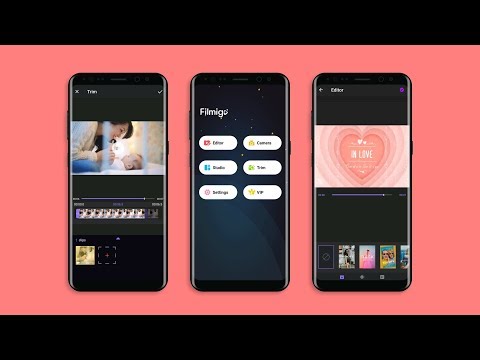
Filmigo AI Video Maker of Photos with Music & AI Video Editor is a powerful AI video creation tool for making stylish music videos and slideshows. With simple steps, combine video clips, trending songs, animated stickers, themed templates, auto captions, subtitle translation, and stunning AI effects to create heartfelt, share-worthy videos for someone special.
As an easy-to-use AI Video Editing app, Filmigo makes creating personalized vlogs and stunning content a breeze. Whether you’re sharing memories with loved ones or aiming to become an influencer, Filmigo helps you shine on platforms like Instagram, TikTok, WhatsApp, Facebook, and REDnote (Xiaohongshu).
Key Features of this AI Video Maker/Photo Editor
【 Professional Editing Tool 】
Filmigo video trimmer and AI Cap Cut offers powerful tools for you to splice/reverse/rotate/trim/split/duplicate your clips and cut the movie. You can cut a video in parts, merge images from your gallery or album, compress video without losing quality like a professional video producer. Also, you can zoom in/speed up/speed down the video to make a super interesting piece of art.
【 AI Video Generator 】
Filmigo integrates advanced AI features that let you turn imagination into reality. Easily generate videos from photos or text, and explore trending AI templates to create viral effects in seconds. From AI Image-to-Video that animates pictures, to AI Text-to-Video that visualizes your stories, and AI Magic Effects Templates that transform your look into cinematic, fantasy, or anime styles — Filmigo makes AI video creation fast, fun, and effortless.
【 AI Smart Edit 】
Edit videos the easy way with AI. Instantly replace, add, or remove elements in your video with just a few taps—no editing skills needed. Create clean, high-quality results in seconds and bring your ideas to life faster than ever.
【 AI Subtitle & Translation 】
Turn speech into subtitles with AI, translate captions into multiple languages in one tap, and display bilingual subtitles with ease.
【 AI Cutout & Background Replace 】
Instantly remove backgrounds from people or objects with AI Cutout. Swap in creative scenes — snowy Christmas, dreamy studio lights, festive parties, or any custom backdrop — all in one tap.
【 AI Seamless Transitions 】
Instantly bridge your clips with high-end AI Transitions that intelligently analyze your frames to create professional, seamless morphs and fluid motion effects in one tap—no manual editing required!
【 AI Music Generator 】
Access trending music, extract audio, add multiple tracks, and create your own BGM with AI Music Generation from text prompts. Add voice-overs or change your voice into robot, monster, and more.
【 Creative Edit & Pro Themes 】
Elevate your videos with Filmigo AI Video Maker’s diverse Exquisite Themes, transition effects, and trending styles—all in one tap. Easily customize your captions with stylish fonts, animated text, and Cute Stickers (GIFs, emojis, animated stickers) to make your videos or slideshows more engaging. Our VIP privilege offers 1080p export, no ads, no watermarks, and unique tools like pixelate and scroll text for a truly professional finish.
【 HD Export & Social Sharing 】
Export videos in 720P/1080P HD with no time limits. Support 9:16 vertical, 1:1 square, and 16:9 formats—perfect for TikTok, Instagram Reels, Rednote, and more. Share instantly with no-crop layouts and smooth playback.
With Filmigo AI Video Maker, anyone can become a storyteller. Create viral short videos, stylish vlogs, and AI-generated masterpieces effortlessly. Beautify your world with smart subtitles, transitions, stickers, doodles, and magic AI effects — all in one app.
If you have any suggestions or questions for Filmigo, please contact us at: filmigo@videoshowapps.com.
Disclaimer:
Filmigo is not affiliated, associated, sponsored, endorsed by, or in any way officially connected with TikTok, Instagram, Facebook, WhatsApp, YouTube, Twitter, CapCut, lemon8, REDnote.
As an easy-to-use AI Video Editing app, Filmigo makes creating personalized vlogs and stunning content a breeze. Whether you’re sharing memories with loved ones or aiming to become an influencer, Filmigo helps you shine on platforms like Instagram, TikTok, WhatsApp, Facebook, and REDnote (Xiaohongshu).
Key Features of this AI Video Maker/Photo Editor
【 Professional Editing Tool 】
Filmigo video trimmer and AI Cap Cut offers powerful tools for you to splice/reverse/rotate/trim/split/duplicate your clips and cut the movie. You can cut a video in parts, merge images from your gallery or album, compress video without losing quality like a professional video producer. Also, you can zoom in/speed up/speed down the video to make a super interesting piece of art.
【 AI Video Generator 】
Filmigo integrates advanced AI features that let you turn imagination into reality. Easily generate videos from photos or text, and explore trending AI templates to create viral effects in seconds. From AI Image-to-Video that animates pictures, to AI Text-to-Video that visualizes your stories, and AI Magic Effects Templates that transform your look into cinematic, fantasy, or anime styles — Filmigo makes AI video creation fast, fun, and effortless.
【 AI Smart Edit 】
Edit videos the easy way with AI. Instantly replace, add, or remove elements in your video with just a few taps—no editing skills needed. Create clean, high-quality results in seconds and bring your ideas to life faster than ever.
【 AI Subtitle & Translation 】
Turn speech into subtitles with AI, translate captions into multiple languages in one tap, and display bilingual subtitles with ease.
【 AI Cutout & Background Replace 】
Instantly remove backgrounds from people or objects with AI Cutout. Swap in creative scenes — snowy Christmas, dreamy studio lights, festive parties, or any custom backdrop — all in one tap.
【 AI Seamless Transitions 】
Instantly bridge your clips with high-end AI Transitions that intelligently analyze your frames to create professional, seamless morphs and fluid motion effects in one tap—no manual editing required!
【 AI Music Generator 】
Access trending music, extract audio, add multiple tracks, and create your own BGM with AI Music Generation from text prompts. Add voice-overs or change your voice into robot, monster, and more.
【 Creative Edit & Pro Themes 】
Elevate your videos with Filmigo AI Video Maker’s diverse Exquisite Themes, transition effects, and trending styles—all in one tap. Easily customize your captions with stylish fonts, animated text, and Cute Stickers (GIFs, emojis, animated stickers) to make your videos or slideshows more engaging. Our VIP privilege offers 1080p export, no ads, no watermarks, and unique tools like pixelate and scroll text for a truly professional finish.
【 HD Export & Social Sharing 】
Export videos in 720P/1080P HD with no time limits. Support 9:16 vertical, 1:1 square, and 16:9 formats—perfect for TikTok, Instagram Reels, Rednote, and more. Share instantly with no-crop layouts and smooth playback.
With Filmigo AI Video Maker, anyone can become a storyteller. Create viral short videos, stylish vlogs, and AI-generated masterpieces effortlessly. Beautify your world with smart subtitles, transitions, stickers, doodles, and magic AI effects — all in one app.
If you have any suggestions or questions for Filmigo, please contact us at: filmigo@videoshowapps.com.
Disclaimer:
Filmigo is not affiliated, associated, sponsored, endorsed by, or in any way officially connected with TikTok, Instagram, Facebook, WhatsApp, YouTube, Twitter, CapCut, lemon8, REDnote.
Filmigo AI video editor with music! Edit video with effect, filter, slow motion!
Updated on
Events & offers


Featured stories

Safety starts with understanding how developers collect and share your data. Data privacy and security practices may vary based on your use, region, and age. The developer provided this information and may update it over time.


Ratings and reviews
1.3M reviews

A Google user
- Flag inappropriate
- Show review history
November 15, 2018
The best video editing/making phone app I've used since! It's honestly great and easy to use, and has easy quick follow pop-ups for people who've never tried editing-apps before. It's fast too. I only wish there was a sound button if, for instance, I wanted to omit the sound off my video clips. But other than that, I'm absolutely pleased and will be using again for sure! Thank you!
489 people found this review helpful
A Google user
- Flag inappropriate
- Show review history
April 28, 2019
At first I thought great I can use this app. not the best but great for what I needed. maybe needs a lot more transitions and also to be able to cut/trim/split more accurately. now it's been updated it's purple? and the options are LESS? WHY? where's the option to split? only allows to trim? and the texts and subtitle options have gone as in there were more and now it's left with mediocre ones. I'm guessing more has changed. very disappointed. PLEASE FOR THE LOVE OF GOD TAKE AWAY THIS UPDATE!
273 people found this review helpful

Vik M
- Flag inappropriate
- Show review history
March 6, 2024
Been using this app since 2020. What a brilliant app! I haven't come across a better one. There are a few things that could be better, if they were added though: be able to change the background (or at least blur it), increase the volume (this is on some other apps), and to be able to change the voice (English, not American - also on some other apps). I wouldn't have to use extra apps if this was the case. Please look into this, thanks! Paid for another year
3,511 people found this review helpful
What’s new
Experience Optimization: Adding subtitles is now more convenient, with even better results!
App support
About the developer
VIDEOSHOW PTE. LTD.
videoshow@videoshowapps.com
11 North Buona Vista Drive
#08-09 The Metropolis
Singapore 138589
+65 9645 9302


