
Filmic Firstlight - Photo App
In-app purchases
star
1.28K reviews

PEGI 3
info
100K+
Downloads




About this app
Filmic Firstlight is a revolutionary photo camera from the makers of the class leading Filmic Pro cinema video camera that makes live photography fun and creative.
-- -- -- -- -- --
Rediscover the joy of capturing life’s moments in photographs you will immediately treasure and want to share.
Firstlight combines custom film simulations, adaptive film grain and Filmic Pro’s famous live analytics to offer an advanced but approachable front end camera experience like no other.
Fast, easy and intuitive, Firstlight lets you envision and capture your best moments in camera, without having to spend hours editing your photos later. Shoot and share, it’s that easy.
-- -- -- -- -- --
ADVANCED IMAGE CONTROLS
- Fast, intuitive focus and exposure controls: Tap the screen to set focus/exposure, tap again to lock
- AE Mode: Included is our proprietary Auto Exposure mode for setting shutter/iso combination
- Cross-swipe manual controls: The most intuitive way to manually adjust focus and exposure. Swipe across the image to dial in your perfect shot. Swipe up and down to adjust exposure. Swipe left and right to adjust focus.
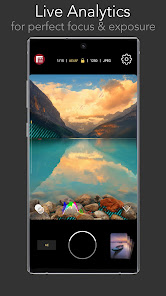
- Reactive analytics: A foundation feature of Filmic Pro and now in a photo app. Manually adjusting your focus and exposure will automatically apply focus peaking or zebra stripes to make sure you get your shot just right.
- RGB Histogram: Dynamically shows the exposure profile of the image across all color channels.
GET THE LOOK YOU WANT
- Vintage film simulations: The magic of Firstlight is in our realistic tributes to authentic film stocks. A range of film simulations are included for free with the app.
- Film grain: Apply natural looking film grain effects to give your photos that ‘film look’. Medium grain is included as a free option.
- Vignette: Apply a subtle dark vignette to your image. Medium vignette is included as a free option.
- Lens selector: Quickly switch between all available lenses on your device. (Note: camera/lens support is device specific).
PROFESSIONAL CAMERA TOOLS
- Burst mode
- Timer
- Flash
- Grid overlays
- Aspect ratios: 4:3, 16:9, 3:2, 1:1, 5:4
- JPG or HEIC Selection
- HDR control (on supported devices only)
- Volume button shutter and support for most bluetooth camera shutter remotes
- Filmic Pro quick launch button (for owners of Filmic Pro)
FIRSTLIGHT PREMIUM (with in-app purchase)
Upgrade to unlock the full potential of Firstlight with the following capabilities:
- Shutter and ISO priority modes: In addition to AE you can set specific Shutter Speed or ISO values to adhere to and let the app automatically adjust exposure for the unlocked value.
- Expanded film simulation options: More realistic film simulations and more to be added in the future for paid subscribers.
- Film grain: Fine, coarse and ISO adaptive options in addition to medium
- Adjustable vignette: Low and heavy options in addition to medium.
- Configurable burst mode
- Anamorphic adapter support
- RAW: DNG and TIFF formats
- Custom Function button
- Custom live analytics
- Configurable Focus and Exposure controls
- Embedded copyright
-- -- -- -- -- --
Rediscover the joy of capturing life’s moments in photographs you will immediately treasure and want to share.
Firstlight combines custom film simulations, adaptive film grain and Filmic Pro’s famous live analytics to offer an advanced but approachable front end camera experience like no other.
Fast, easy and intuitive, Firstlight lets you envision and capture your best moments in camera, without having to spend hours editing your photos later. Shoot and share, it’s that easy.
-- -- -- -- -- --
ADVANCED IMAGE CONTROLS
- Fast, intuitive focus and exposure controls: Tap the screen to set focus/exposure, tap again to lock
- AE Mode: Included is our proprietary Auto Exposure mode for setting shutter/iso combination
- Cross-swipe manual controls: The most intuitive way to manually adjust focus and exposure. Swipe across the image to dial in your perfect shot. Swipe up and down to adjust exposure. Swipe left and right to adjust focus.
- Reactive analytics: A foundation feature of Filmic Pro and now in a photo app. Manually adjusting your focus and exposure will automatically apply focus peaking or zebra stripes to make sure you get your shot just right.
- RGB Histogram: Dynamically shows the exposure profile of the image across all color channels.
GET THE LOOK YOU WANT
- Vintage film simulations: The magic of Firstlight is in our realistic tributes to authentic film stocks. A range of film simulations are included for free with the app.
- Film grain: Apply natural looking film grain effects to give your photos that ‘film look’. Medium grain is included as a free option.
- Vignette: Apply a subtle dark vignette to your image. Medium vignette is included as a free option.
- Lens selector: Quickly switch between all available lenses on your device. (Note: camera/lens support is device specific).
PROFESSIONAL CAMERA TOOLS
- Burst mode
- Timer
- Flash
- Grid overlays
- Aspect ratios: 4:3, 16:9, 3:2, 1:1, 5:4
- JPG or HEIC Selection
- HDR control (on supported devices only)
- Volume button shutter and support for most bluetooth camera shutter remotes
- Filmic Pro quick launch button (for owners of Filmic Pro)
FIRSTLIGHT PREMIUM (with in-app purchase)
Upgrade to unlock the full potential of Firstlight with the following capabilities:
- Shutter and ISO priority modes: In addition to AE you can set specific Shutter Speed or ISO values to adhere to and let the app automatically adjust exposure for the unlocked value.
- Expanded film simulation options: More realistic film simulations and more to be added in the future for paid subscribers.
- Film grain: Fine, coarse and ISO adaptive options in addition to medium
- Adjustable vignette: Low and heavy options in addition to medium.
- Configurable burst mode
- Anamorphic adapter support
- RAW: DNG and TIFF formats
- Custom Function button
- Custom live analytics
- Configurable Focus and Exposure controls
- Embedded copyright
Modern photos with analog vibe
Updated on
Featured stories

Safety starts with understanding how developers collect and share your data. Data privacy and security practices may vary based on your use, region, and age. The developer provided this information and may update it over time.


Ratings and reviews
1.26K reviews

Frank Langford
- Flag inappropriate
- Show review history
November 29, 2020
Installed on a OnePlus 8T. With Android 11. Level not working. Cannot select wide angle or macro. This is the paid for version. Horizontal shots are saved as vertical. This is intermittent though. This could be a problem with Google Photos. Apart from that it's very good. I do like the ability to save in various format's. The level option has just started working, most odd . Retract that level now not working again . One more thing. GPS location not working either . Mr Frank Langford.
25 people found this review helpful
Mosaic Srl
November 30, 2020
Hi Frank, thanks for your comments, about wide angle or macro, if the manufacturer has locked other lenses for 3rd party apps, we cannot use them 😌. We will research your problems with level, gps an orientation. Thank you for your comments and have a nice day!

Natalie Wright
- Flag inappropriate
- Show review history
May 27, 2023
Good app, manual controls, but there is a bug using the telephoto camera on the pixel 6 pro. You frame a shot, but the resulting capture is not what you framed, it jumps up the image by about 20% Needs fixing. Update may 2023 Just checked the app, now there is no option to use the telephoto camera. The "fix" was to remove it as an option? When, if ever, is this to be fixed? It has been reported for months.
5 people found this review helpful
Mosaic Srl
October 4, 2022
Hello Natalie! Could you please give us more details about the issue via www.filmicpro.com/support#contac ? Our support team will be happy to guide you to the solution! Thank you and have a nice day!

David Reeves
- Flag inappropriate
May 23, 2020
The only decent stock camera app alternative for me. Love the ability to save only as a dng without a jpeg copy. And the intuitiveness of changing focus and exposure with guides is one of the best things about the app. However there are a few bugs here and there, in my case the in app gallery ui was only showing for a split second. As well as this the file format changes back to jpeg whenever changing which camera is used, not a huge issue but can be prone to forgetting and is a small hassle.
2 people found this review helpful
Mosaic Srl
May 25, 2020
Hi David. We are having gallery problems with a small set of devices, we are working on it. Thank you for your review and have a nice day!
What’s new
* Several bugs fixed.
App support
About the developer
MOSAIC SRL
support@bendingspoons.com
VIA NINO BONNET 10
20154 MILANO
Italy
+1 650-379-0922


